
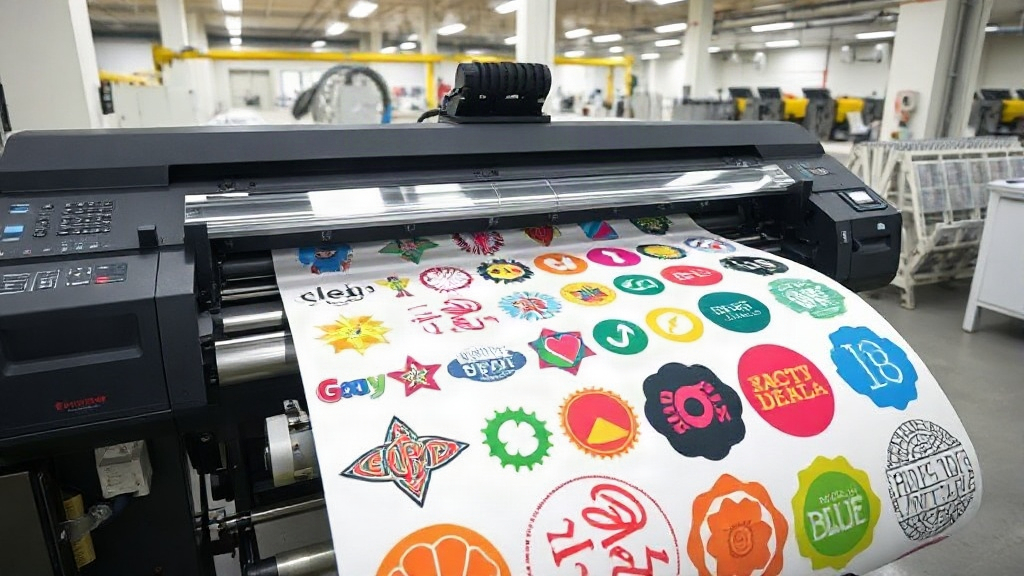
If you're in the custom apparel business, you've probably heard about DTF printing. It's a game-changer for transferring designs onto fabrics with vibrant colors and fine details. But did you know that you can take your efficiency to the next level with DTF gangsheets? Whether you're a small shop owner or a large-scale producer, understanding gangsheets can save you time, money, and a lot of frustration. In this guide, we'll dive deep into what gangsheets are, why they matter, and how to create and use them effectively. By the end, you'll be ready to implement this strategy and watch your productivity soar.
What is a DTF Gangsheet?
A DTF gangsheet is essentially a large sheet of transfer film that contains multiple designs printed together. Instead of printing each design individually, you arrange several designs on a single sheet, maximizing the use of the film and reducing waste. The term "gang" refers to grouping multiple items together, and that's exactly what you're doing: ganging up your designs to print as one unit.
This approach is similar to gang printing in offset lithography, where multiple jobs are combined on one press sheet. In DTF printing, gangsheets allow you to print a variety of designs in one go, which is especially useful when you have many small orders or need to produce a batch of different sizes.
Why Use DTF Gangsheets?
The benefits of using gangsheets are numerous, but let's focus on the most impactful ones:
- Cost Efficiency: By maximizing the use of each sheet, you reduce the amount of wasted film and ink. This lowers your cost per transfer, which can significantly improve your profit margins.
- Time Savings: Printing multiple designs at once means fewer setup times and less handling. You can produce a large batch of transfers in a fraction of the time it would take to print them individually.
- Consistency: When you print designs together, they go through the same curing and powdering process, ensuring consistent quality across all transfers.
- Flexibility: You can mix and match designs of different sizes and quantities on one sheet, making it easy to fulfill varied orders.
Imagine you have an order for 50 t-shirts with 10 different designs. Without gangsheets, you'd print each design separately, possibly wasting film and time. With a gangsheet, you can arrange all 10 designs on one or two sheets, print them in one pass, and then cut them apart. The savings in time and materials are substantial.
How to Create a DTF Gangsheet
Creating a gangsheet requires some planning and the right tools. Here's a step-by-step guide to help you get started:
1. Choose Your Designs
Select the designs you want to include. Consider the sizes and quantities needed. If you're printing for multiple orders, group designs that share similar ink coverage or color profiles to optimize printing conditions.
2. Use Gangsheet Builder Software
Many DTF printers come with RIP software that includes a gangsheet builder. Alternatively, you can use standalone tools like Gangsheet Builder or even design software like Photoshop or Illustrator. The key is to arrange your designs efficiently on the canvas. Aim to minimize empty space while leaving enough room for cutting.
3. Set Up Your Sheet Size
Standard DTF film comes in rolls, typically 13, 17, or 24 inches wide. You can cut the film to your desired length. When creating a gangsheet, set your canvas to the width of your film and a length that accommodates all your designs. For example, if you have a 24-inch wide film, you might create a sheet that is 36 inches long.
4. Arrange Designs with Nesting
Nesting is the art of fitting designs together like puzzle pieces to use as much of the sheet as possible. Rotate designs if necessary, but keep in mind that some designs may need to be oriented a certain way for printing. Most gangsheet builders have auto-nesting features, but manual adjustment can sometimes yield better results.
5. Add Registration Marks and Cut Lines
Registration marks help align the film during printing and cutting. Cut lines (usually thin outlines) indicate where to cut after transfer. Including these ensures precise cutting and application.
6. Print, Cure, and Powder
Once your gangsheet is ready, print it using your DTF printer. Follow your printer's settings for ink limits and pass count. After printing, apply hot melt powder and cure the sheet according to your powder's specifications. Now your gangsheet is ready to be cut into individual transfers.
Best Practices for DTF Gangsheets
To get the most out of your gangsheets, follow these best practices:
- Plan Ahead: Group designs by size and ink coverage. If you have a mix of light and heavy ink designs, consider separate sheets to avoid over-curing lighter areas.
- Leave Space for Cutting: Don't place designs too close to each other. Leave at least 0.25 inches between designs to allow for clean cuts.
- Test Print: Before printing a full gangsheet, do a small test to ensure colors and registration are correct.
- Keep Records: Note the settings and layout for future reference. This helps replicate successful gangsheets.
- Use Quality Film: Cheap film can cause ink bleeding or poor transfer. Invest in high-quality DTF film for best results.
Common Mistakes to Avoid
Even experienced printers make mistakes with gangsheets. Here are some pitfalls to watch out for:
- Overcrowding: Packing too many designs can lead to cutting errors and ink smudging. Leave adequate space.
- Ignoring Ink Limits: Each printer has a maximum ink limit per area. Exceeding it can cause pooling and poor adhesion.
- Forgetting to Mirror: DTF transfers are printed mirrored, so ensure your designs are flipped horizontally before printing.
- Inconsistent Powdering: Uneven powder application can result in transfers that peel or crack. Use a powder shaker for even coverage.
Frequently Asked Questions
What is the maximum size for a DTF gangsheet?
The maximum size depends on your printer and film width. Most DTF printers support film widths up to 24 inches, and the length can be as long as your software and printer allow, often up to several feet. However, practical limits exist due to handling and curing equipment.
Can I reuse a DTF gangsheet?
No, DTF gangsheets are single-use. Once the transfers are cut and applied, the sheet is spent. However, you can save the digital file and reprint it as needed.
How do I price DTF gangsheet transfers?
Pricing depends on your costs (film, ink, powder, labor) and market rates. Calculate your cost per square inch and add your desired profit margin. Many printers charge per transfer based on size, with discounts for bulk orders.
What software is best for creating DTF gangsheets?
Popular options include DTF RIP software like Cadlink, AcroRIP, and EKPrint. Some printers come with proprietary software. For manual layout, Adobe Illustrator or Photoshop work well, but dedicated gangsheet builders offer auto-nesting and other time-saving features.
How do I store DTF gangsheets before use?
Store them in a cool, dry place away from direct sunlight. Keep them flat to avoid creasing. If stacked, place a sheet of parchment paper between them to prevent sticking. Use within a few weeks for best results.
Mastering DTF gangsheets is a skill that pays off in efficiency and cost savings. With careful planning and the right tools, you can streamline your production and take on more orders without sacrificing quality. Start experimenting with gangsheets today and see the difference in your workflow.